kafka
Kafka is a distributed publisher-subscriber system which can be used for event streaming( pub-sub model) , message queues and batch processing. Kafka uses kafka-brokers to run and store data.

Thu, Dec 25, 2025
3 min read
What exactly is kafka?
Kafka is a distributed publish-subscribe messaging system which can be used for event streaming( pub-sub model) , message queues and batch processing. Kafka uses kafka-brokers to run and store data. The kafka architecture includes a kafka cluster which consist of different brokers that include topics which are like a categorized box where the producers send events or data and consumers subscribe to the topic and get the same events or data in same order sent by the producers.
The topics are further divided into sub-boxes known as partitions which helps in parallel processing. Different brokers include many partitions of the topics for parallel processing so that if one partition is used to write data , the another follower broker can help the consumer read the data from the topic. The brokers follow master-slave( leader-follower) architecture which is managed by the kafka-zookeeper responsible for resource allocation , fault tolerence , parallel processing , etc.
kafka architecture
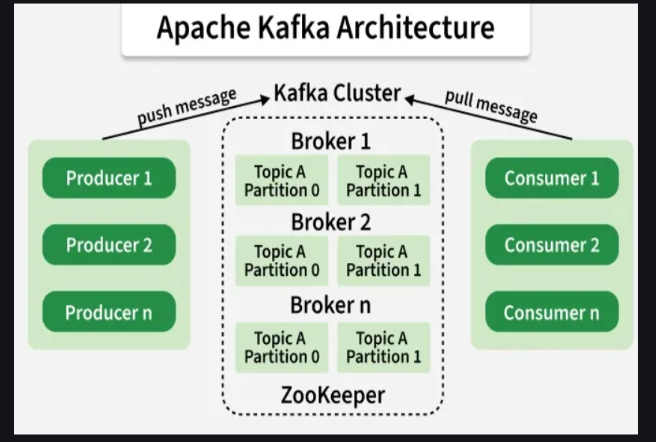
Core components of kafka :
- Kafka cluster
- A distributed system of multiple kafka-brokers.
- Brokers
- Kafka servers that handles read/write operations and replications for reliability
- Topics & partitions
- Topics store similar kind of data into sub-boxes called partitions for parallel processing and horizontal scaling
- Producers
- Client applications that write data to topics further distributed into partitions
- Consumers
- Appplications that read data from topics which are grouped as consumer groups to enable load balancing.
- Zookeeper
- Manages and coordinates kafka brokers , handles resource allocation, synchronization and leader election
- Offsets
- Unique id’s for each messages in a partition , used by consumers to track read progress.
Interactions in kafka Architecture :
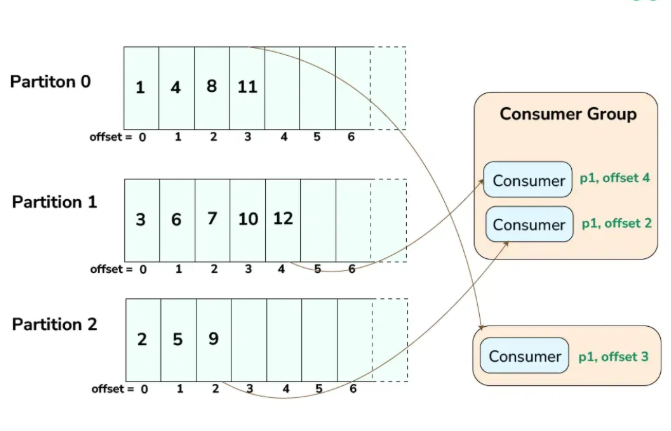
- Producers to Kafka Cluster: Producers send data to the Kafka cluster. The data is published to specific topics, which are then divided into partitions and distributed across the brokers
- Kafka Cluster to Consumers: Consumers read data from the Kafka cluster. They subscribe to topics and consume data from the partitions assigned to them. The consumer group ensures that the load is balanced and that each partition is processed by only one consumer in the group.
- ZooKeeper to Kafka Cluster: ZooKeeper coordinates and manages the Kafka cluster. It keeps track of the cluster's metadata, manages broker configurations and handles leader elections for partitions.
Event Driven architecture with nodejs/express with kafka between different services
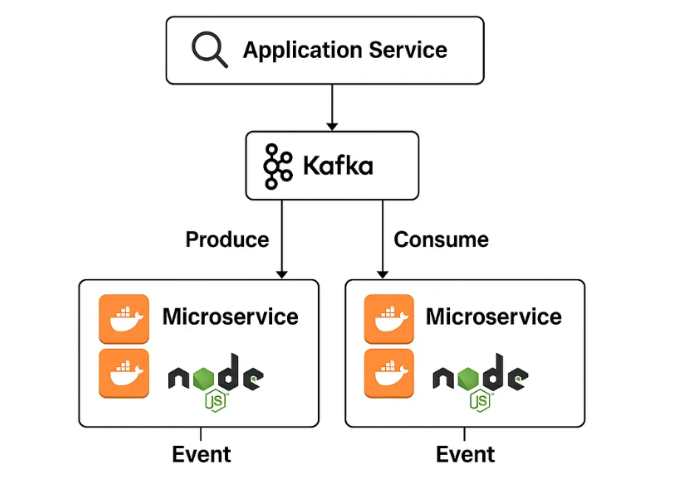
As systems grow in scale and complexity. They have to be divided into different decoupled microservices for breaking down the complexity and handling the scalability. Now, communication between these services becomes quite difficult, where kafka comes into picture for real-time , low latency and high throughput event streaming with data incorporating a pub-sub model.
docker-compose.yml file to setup kafka:
- setup docker-compose.yml file in your root.
- run docker-compose up -d to run kafka using docker.
version: '3.9'
services:

  kafka:
    image: bitnami/kafka:3.7
    environment:
      - KAFKA_ENABLE_KRAFT=yes
      - KAFKA_CFG_NODE_ID=1
      - KAFKA_CFG_PROCESS_ROLES=controller,broker
      - KAFKA_CFG_CONTROLLER_QUORUM_VOTERS=1@kafka:9093
      - KAFKA_CFG_LISTENERS=PLAINTEXT://:9092,CONTROLLER://:9093
      - KAFKA_CFG_ADVERTISED_LISTENERS=PLAINTEXT://localhost:9092
      - KAFKA_CFG_LISTENER_SECURITY_PROTOCOL_MAP=CONTROLLER:PLAINTEXT,PLAINTEXT:PLAINTEXT
      - KAFKA_CFG_CONTROLLER_LISTENER_NAMES=CONTROLLER
      - KAFKA_CFG_AUTO_CREATE_TOPICS_ENABLE=true
    ports:
      - "9092:9092"
    volumes:
      - kafkadata:/bitnami/kafka


volumes:
kafkadata:- Use node-rdkafka(native , low latency , high-throughput and performance) as kafka-client to connect to kafka broker.
- refer to this repository to test the kafka-client.
Refrences:
- https://www.geeksforgeeks.org/apache-kafka/apache-kafka/
- https://www.geeksforgeeks.org/apache-kafka/kafka-architecture/
- https://www.geeksforgeeks.org/advance-java/microservices-communication-with-apache-kafka-in-spring-boot/
- https://medium.com/@hridoymahmud/building-a-scalable-microservices-architecture-with-kafka-and-express-js-4f5c800dfbe6
- https://medium.com/@khimjimca/event-driven-architecture-with-node-js-microservices-and-kafka-b889a77f799f
